 Nudge Invest
Features
Everything the tracker does, and exactly what the optional AI coach adds. The tracker is free; nothing on this page except the coach costs money.
Track
Every asset type
Stocks, ETFs and index funds, REITs, cryptocurrencies and stablecoins. One list, one net worth number.
Buy, Sell, Dividend, DRIP
Four transaction types with fees. DRIP is modelled correctly as both income and a purchase, so reinvested cost basis is right.
Where it is held
Every transaction records its custody — broker, exchange or wallet — so you can see concentration on any one platform.
Multi-currency
Assets in USD, EUR, GBP, UAH, anything. Display in one currency using exchange rates you enter; stale rates are flagged after 30 days.
Notes
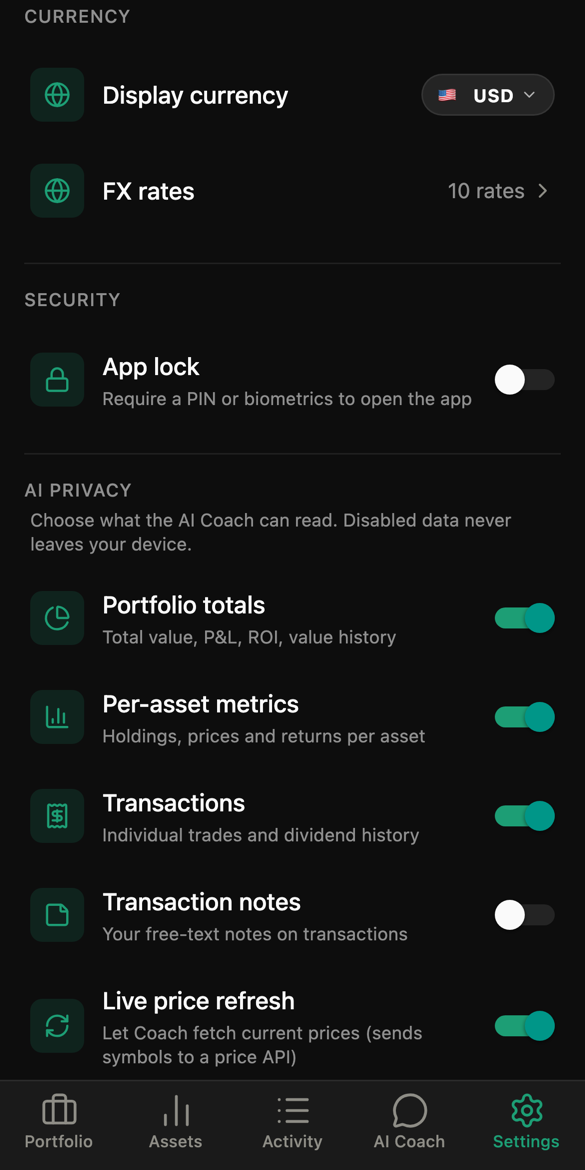
Free-text notes on any transaction — “staking reward”, “tax lot 2”. Notes are private by default and never sent to the AI coach unless you allow it.
Daily snapshots
The app records a daily portfolio value so the history chart reflects what your portfolio was actually worth, not a back-calculation.
Understand
Cost basis & average price
Per asset and in aggregate, fees included. The number that decides whether a sale is a gain or a loss.
Realised & unrealised P&L
What you have banked versus what is still on the table, side by side.
ROI — with and without dividends
Two ROI figures, because for an income portfolio the second one is the honest one.
Dividend income
By asset, this year and all time. See what the portfolio actually pays you.
Allocation
Donut by asset type or by custody; a P&L bar chart per asset; top and bottom performers.
Value history
Invested amount and portfolio value over time, on one chart, in your display currency.
Own your data
Offline-first, on-device
Everything is stored in a local SQLite database on the phone. No account, no cloud sync, no background uploads, no telemetry by default.
CSV import & export
Export the entire portfolio as CSV whenever you like. Import CSV from anywhere, with a duplicate-aware preview so re-importing never double-counts.
App lock
4-digit PIN as the base credential, optional fingerprint / face unlock on top, idle auto-lock. Never biometric-only.
No ads
The free tracker has no ads and no “upgrade” nags in the data. The only paid surface is the coach tab.
Wipe in one tap
Settings → Wipe all data removes everything locally. There is no server copy to chase.
Tablets & foldables
Rotates and resizes properly on large screens.
Optional AI coach
A private analyst for your own numbers. Paid, optional, and gated by per-category privacy switches.
- Ask anything about your portfolio — concentration, income, what changed, what a metric means.
- Import statements from PDF, Excel, CSV or a screenshot. The coach proposes transactions; nothing is saved until you approve.
- Refresh prices and exchange rates on request (opt-in), again as proposals you approve.
- Web search for public facts like inflation — off by default.
- You choose what it sees. Totals, per-asset metrics, transactions and notes each have their own switch.
Educational and analytical only. The coach cannot trade, cannot move money, and does not give personalised investment advice.
Feature questions
Does Nudge Invest fetch live prices?
Not automatically — by default you enter or update prices yourself, which is what keeps the app fully offline. If you enable the AI coach and switch on Live price refresh in AI privacy, you can ask the coach to fetch current quotes (crypto via CoinGecko, stocks and ETFs via Twelve Data) and it proposes the updates for your approval.
Can I track cash?
Yes — add a stablecoin or a cash-like holding and it flows into net worth and allocation like anything else.
How many currencies can a portfolio mix?
As many as you hold. Each asset has its own currency; the portfolio is displayed in the currency you pick, converted with exchange rates you enter and control. Rates older than 30 days are flagged as stale.
Track your portfolio privately
Free on Android. No account, no cloud, no ads — your data stays on your phone.